


Hey friends, I would really appreciate your help with the fo...
Latest reply
Hey friends, I would really appreciate your help with the following two issues. So you have more context, the situation is th...
Latest reply
Sign in with your Airbnb account to continue reading, sharing, and connecting with millions of hosts from around the world.

Hi How do I share my listing a reveiws on Facebook .
Answered! Go to Top Answer

Hey there @Carol9057 👋
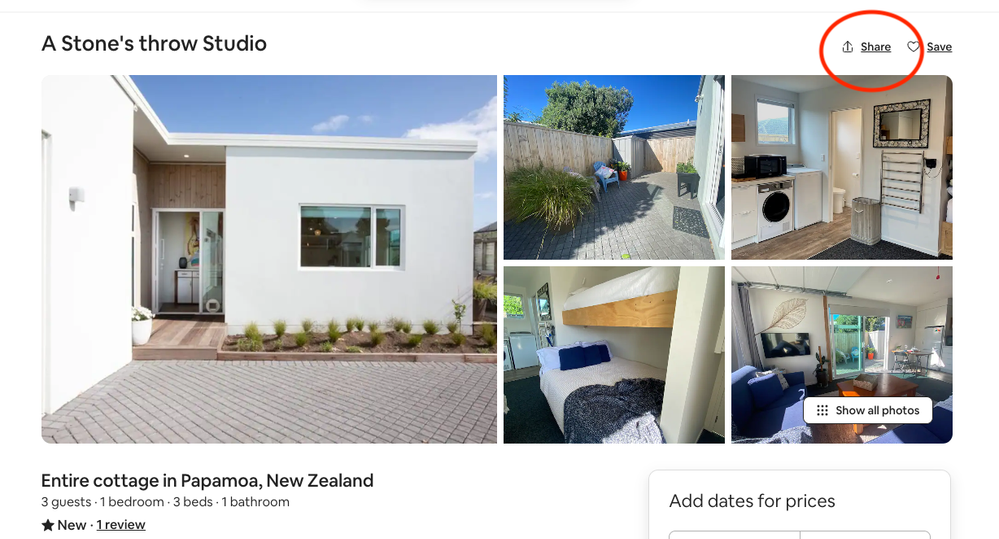
If you head to your listing page you'll find the 'share' button on the top righthand side 👇
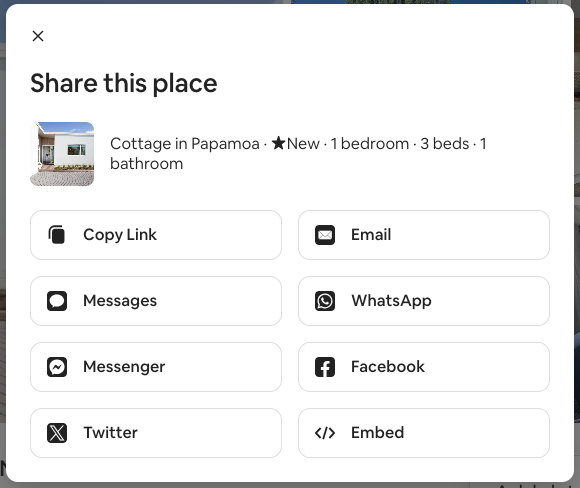
From there, you can select Facebook or any other way to share your listing.
I hope this helps!

Just copy and paste your Airbnb link. I think it’s on your profile.
Hey there @Carol9057 👋
If you head to your listing page you'll find the 'share' button on the top righthand side 👇
From there, you can select Facebook or any other way to share your listing.
I hope this helps!

I would suggest SearchMyCal. It's like Linktree, but built specifically for short-term rental hosts. It’s perfect for sharing your Airbnb listing on Facebook or answering guest inquiries with a link that has dates preselected, reducing friction and making it easier for guests to book. Instead of sending them straight to Airbnb—where they might browse other listings—SearchMyCal keeps them focused on your property until the final step. Plus, if you have a following, you can use it to regularly share last-minute availability, ensuring your audience always sees your latest openings and can book instantly.


