

I currently do not require a pet fee however, cleaning after...
Latest reply
I currently do not require a pet fee however, cleaning after a pet can be time consuming and I am considering adding one. I h...
Latest reply
Sign in with your Airbnb account to continue reading, sharing, and connecting with millions of hosts from around the world.

Is there a way to set the availability window to 1 month?
Answered! Go to Top Answer

Hello @Sam4573
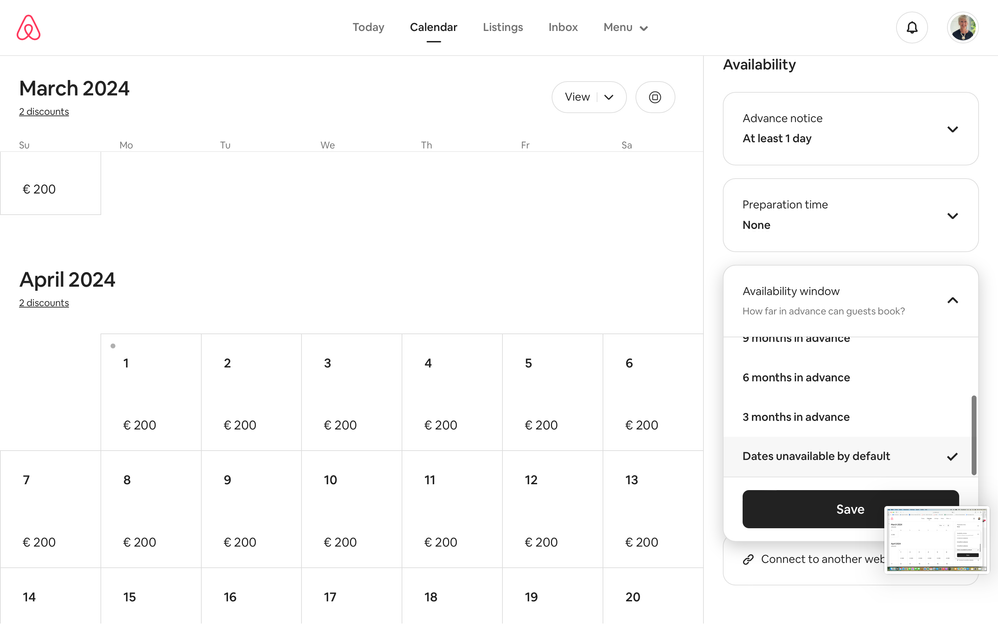
Yes you can achieve this by going into your calendar and clicking on Availability which you see on the top right hand side of the calendar page.
Click on Availability window and select Dates unavailable by default and SAVE
You will then have to manually unblock any dates in the future you wish guests to reserve. Just bear in mind that by having such a small booking window, this will affect your chances of being selected by the algorithm.
All the best
Joëlle

I wish. I do it manually, day by day. Currently I'm doing a 6 - 8 week window. We are careful to not book too far in advance.
Hello @Sam4573
Yes you can achieve this by going into your calendar and clicking on Availability which you see on the top right hand side of the calendar page.
Click on Availability window and select Dates unavailable by default and SAVE
You will then have to manually unblock any dates in the future you wish guests to reserve. Just bear in mind that by having such a small booking window, this will affect your chances of being selected by the algorithm.
All the best
Joëlle
Yes, I saw that but thought there was a way which I may have been missing to automate it.
Thanks


