
I’d like to hear from other hosts about a situation that has...
Latest reply
I’d like to hear from other hosts about a situation that has seriously affected my trust in Airbnb.A guest booked my property...
Latest reply
Sign in with your Airbnb account to continue reading, sharing, and connecting with millions of hosts from around the world.

I noticed today a issue (?) on the website with Professional Tools
I wanted to post in Pro Tools Discusson Board, but it does not allow access to post @Scott
Rules sets can be edited and created from the mullticalender, and a separate color can be assigned, so it is more visible where en which rule sets are applied
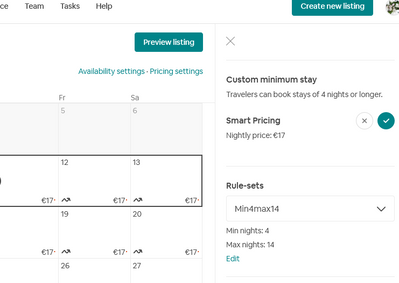
But when i go to the single calender (the calender icon when managing a listing) , the calender does not show any sign of a ruleset active. But when selecting a time period where a ruleset is active, that rule set it displayed on the right. With option to edit (or create new one).
But..... none of the options seem to work. When i click on "edit" (see screen shot) nothing happens. Tried on Firefox and Chrome.
Is it just me or is it a glitch ?

@Emiel1 This has always been the case on my calendar. Color-coding of rule sets, or any visual clue that a rule set exists, is only available on the multi-calendar.
But something is strange: we can not see the rule sets on the regular calender, but an option to manage rules sets (which does not work on my side) is available, after selecting a time period .
@Emiel1 Ah yes, the edit link on the single is broken for me as well. I never play with rulesets on the single calendar since it is so un-userfriendly.