


In recent years, artificial intelligence has transformed man...
Latest reply
In recent years, artificial intelligence has transformed many aspects of our daily lives, and I decided to explore how it cou...
Latest reply
Sign in with your Airbnb account to continue reading, sharing, and connecting with millions of hosts from around the world.

A unique profile number is assigned to each Airbnb member when they create their profile. This number is rarely used because it’s seldom needed.
If the profile number is requested, the question “Where can I find my number?” often arises.
For example, it is requested when joining the official Airbnb Facebook groups. And sometimes it can also be quite useful to look up another profile using this number.
The profile number should not be confused with the listing number. While each member may only create one profile, any number of listings is possible. You also have a profile number without a listing (i.e. as a guest).
Web link
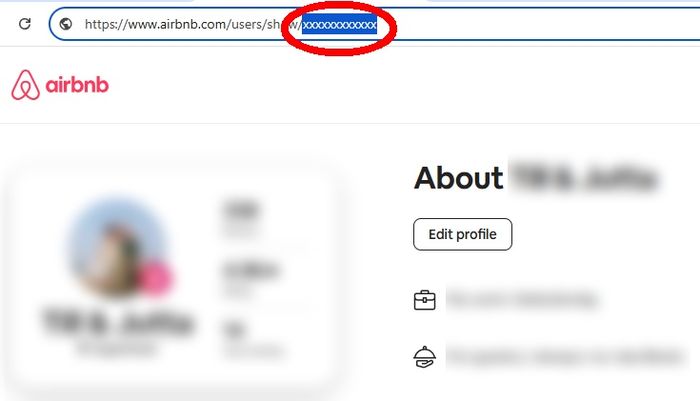
The profile number is part of the URL (web address), i.e. the profile link in the browser.
This works well on a PC: Click on the link www.airbnb.com/hosting: When you are logged in, you will be taken to your dashboard. Click on your profile picture at the top right. You will then see the URL in the address bar at the top of the browser. You can copy the number from the highlighted area:


Does this still work with the updated AirBNB interface? I have been desperately trying to find out my host number but it won't show anywhere. The profile picture is only connected to generic links like https://de.airbnb.com/users/profile/about?context=host.

Hi @Tim-David0,
The step-by-step that @Till-and-Jutta0 put together should still be accurate -I went on your profile and the URL looked like this: https://www.airbnb.co.uk/users/show/416817651
The number at the end is your profile number, is that what you needed?
Let us know if you have more questions 🙂
Emilie
-----
Merci de jeter un oeil aux Principes du Community Center/ Please follow the Community Guidelines

Hi Emilie
I am having the same problem. I cannot find my User ID and I need it for my STR license application in Ontario, Canada. When I click on my profile, the I only see a generic URL that reads: https://www.airbnb.ca/users/profile/about?context=host. Can you see my User ID when you click on my profile?
Thanks,
Jen
I am having the same problem. I cannot find my User ID and I need it for my STR license application in Ontario, Canada. When I click on my profile, the I only see a generic URL that reads: https://www.airbnb.ca/users/profile/about?context=host.

Yes, I think AirBnB has changed their site behavior to make profile ID more opaque.. the above instructions no longer work as of January 2026.
I was able to find mine finally by typing in:
https://www.airbnb.com/users/show/
while I was signed into my account, upon doing this it redirected to my own profile (the missing ID part of the URL was automatically populated because I was already signed in).
It's not very intuitive but the other steps indicated - clicking on your profile pic and logging into your dashboard no longer shows it as others have suggested. For now at least the above seems to work for me.


