

I had a guest instant book for a checkin today. We have a st...
Latest reply
I had a guest instant book for a checkin today. We have a strict 4pm checkin time & they showed up at 2:15 saying they chose ...
Latest reply
Sign in with your Airbnb account to continue reading, sharing, and connecting with millions of hosts from around the world.

Airbnb brings me many guests. I love it. However, reviewing so many guests is error prone.
I just discovered that I have been filling out, but NOT SUBMITTING many guest reviews.
We are required to save our reviews, THEN submit on a NEW page.
While filling out the reviews, new page refreshes are slow, fatigue does set in and I errantly forget to submit 😞
Airbnb are smart people and they can do better. They only need to look at the success of Amazon's ONE-Click shopping or UBER's one click reviewing. to realize the importance of streamlining.
ALL of my guests are 5 star. Why can't there be a one-click 5 star for all categories - default rating?
Or a canned default personal write up?

Very interesting Paul.
I wonder if I have done the same. I'm going to check it out right now.
And I wonder if it is the same problem for guests writing reviews.
Thanks for pointing it out.

Paul
I use notebook or desktop computer to write reviews about the guests.
I have just to write the review, mark stars and then click on SAVE. It is all in the same page.
As for the idea "one-click 5 star for all categories" is fine.
Save is NOT Submit.
Submit is on the next page.
The fact is, If i press SAVE, the review appears on the guest profile (of course, after 14 days time limit or when both has already writen a review).

Hmm - I review a guest in under 15 seconds on a laptop. A quick blurb, click, click, click, click, down the page on each 5-star then I press submit. All on the same page. Pretty simple, I thought. When I'm a guest ... The review process takes FOREVER. I am so surprised (and thankful) when guests actually take the time to leave me a review.
Hmm, you must have a different version than I do.
Google Chrome?
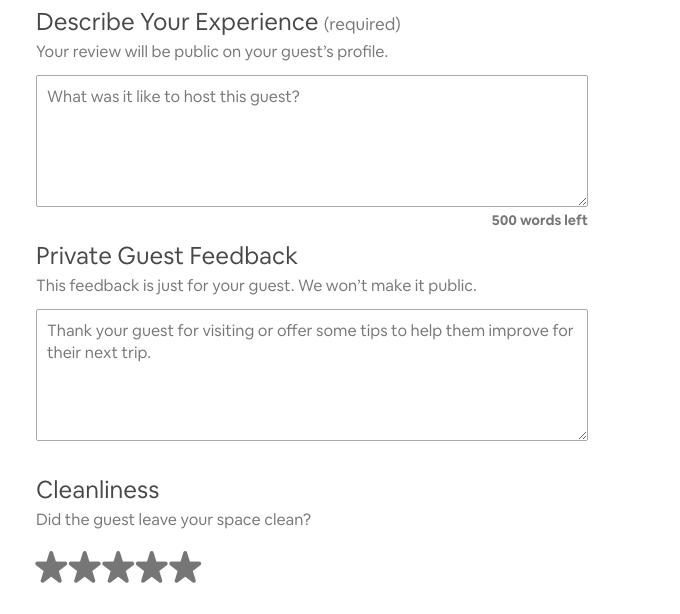
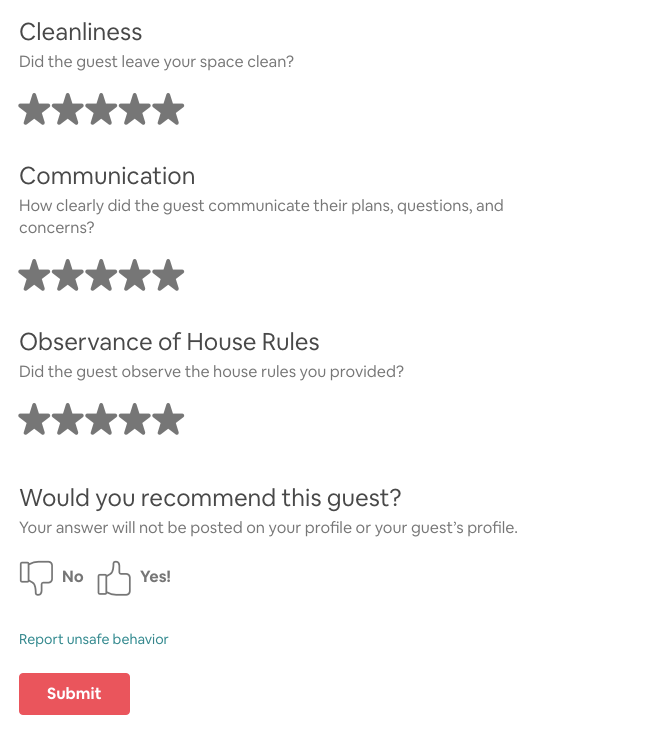
@Paul154, I am finally getting around to sending a picture of what it looks like when I review a guest. All on one page and then submit. Does it look like this for you?


I'm not sure with your statement, cause you are an experience host.. but if I see your problem correctly..
from my point of view.. when I submitted my review it is impossible to retype or even edit a miss typo.. the second page usually make me re read what I have write and make sure it is in correct term and truth I want to show.. it is a difference of another single button of confirmation..
how ever I also realize that using an airbnb app on mobile or I pad is different than using airbnb through chrome.. there always glitches at the software may be cause by the size of the server or other IT problem..
I don't think is fair if you compare a soccer team and a basket ball team .. but if you compare the apps to other accomodation platform.. that would obviously become a very interesting discussion.. the plus and minuses .. unfortunately www.booking.com can not be shown at most events..
sincerely, -MANASUI-

Hi @Paul154. I tend to do my reviews on the IPad, rather then the PC. It seems quicker.....
I keep a bevy of draft reviews in “notes”.
I use these to cut and paste and edit - all in notes with the guest name as a title.
This method assists for like minded couples, family groups etc.
Once I’m happy with no typo errors, I copy and paste directly into Airbnb reviews. But yes, the two pages is probably to stop us submitting something illegible or “not a good idea to publish!” Lol..
🙂
Cathie
PS: but I do hear your pain..... 🙂


